> ## Documentation Index
> Fetch the complete documentation index at: https://www.vozo.ai/docs/llms.txt
> Use this file to discover all available pages before exploring further.
# Get Started
> Learn about the APIs provided by Vozo, their pricing, and how to use them.
If you encounter any issues, please contact [support@vozo.ai](mailto:support@vozo.ai).
## Overview
The Vozo API currently supports the following APIs:
1. Translate and Dub API
2. LipSync API
3. Reusable LipSync API
## Pricing
1. Pricing follows the same structure as submitting jobs via the Vozo portal: [Points Usage for AI Tools](https://www.vozo.ai/docs/common/tools-points-rules)
2. Points are deducted from your account once a job completes successfully. If your balance is insufficient, subsequent API requests will fail.
## Getting the API Key
1. API access is available exclusively for users on the Studio plan and above. Please contact [bd@vozo.ai](mailto:bd@vozo.ai) to request API access.
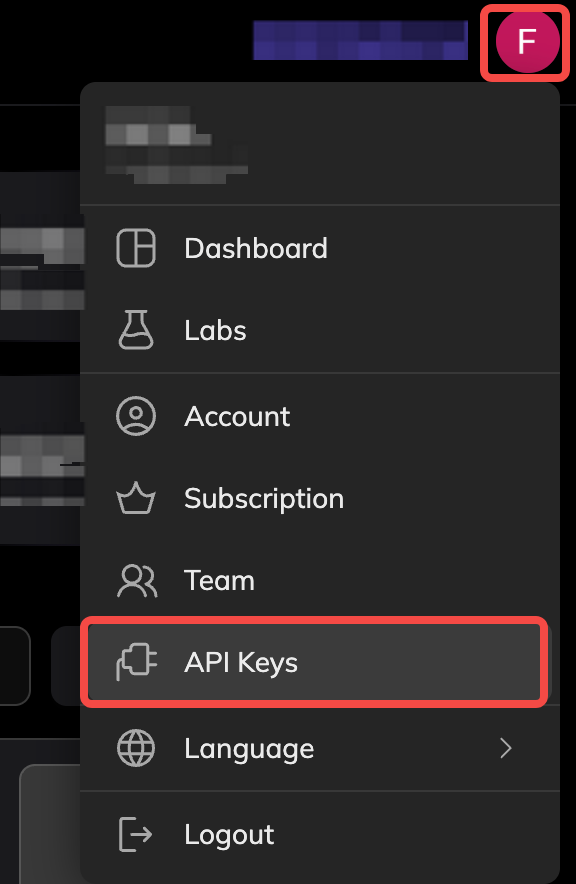
2. After approval, you could find the "API Keys" in your profile dropdown:
 ## Frequently Asked Questions
You can check the detailed point usage for each project on the Dashboard – top right avatar → [Points Usage History](https://app.vozo.ai/points_history) – and export the data for your records.
No. Priority is determined by subscription plan. If you need faster prociessing, please contact [bd@vozo.ai](mailto:bd@vozo.ai).
## Frequently Asked Questions
You can check the detailed point usage for each project on the Dashboard – top right avatar → [Points Usage History](https://app.vozo.ai/points_history) – and export the data for your records.
No. Priority is determined by subscription plan. If you need faster prociessing, please contact [bd@vozo.ai](mailto:bd@vozo.ai).